On this page (9 sections)
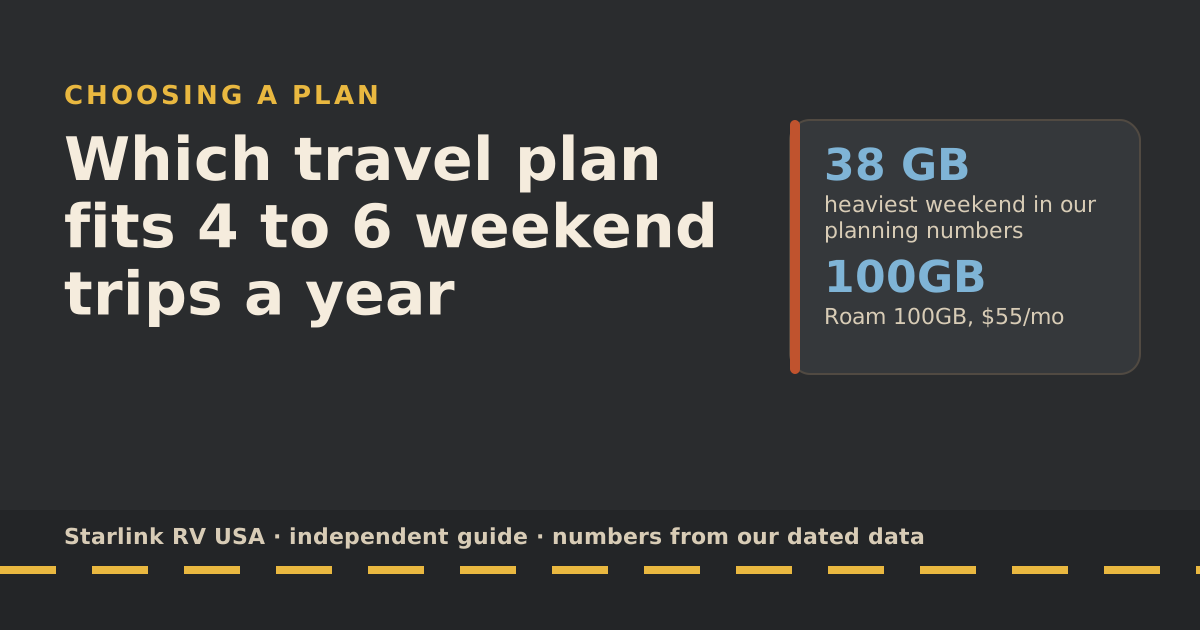
For 4 to 6 weekend trips a year, the smallest travel plan, Roam 100GB at $55/mo, is plenty: even a household that streams most of the day uses well under 100GB in a weekend. The decision that actually moves your yearly cost is how many months you keep the plan switched on. And if your campgrounds have good cell signal, your phone’s hotspot beats every satellite plan on price.
Weekend campers get the worst deal from monthly billing. You pay for 30 days and use 2 or 3. So this guide spends less time on allowances and more on the calendar.
Step 1: count your weekends, then count your months
Get last year’s trips or this year’s bookings and write down two numbers.
- Weekends: how many trips.
- Billing months: how many different calendar months those trips fall in. Starlink starts your billing cycle on the day the kit is first activated, and you’re billed at the start of each cycle. Each month with a trip in it is a month you pay for.
Six weekends in six different months means six months of service. Six weekends packed into June, July and August means three. That one difference is worth $165 a year on Roam 100GB.
Step 2: how much data a weekend really uses
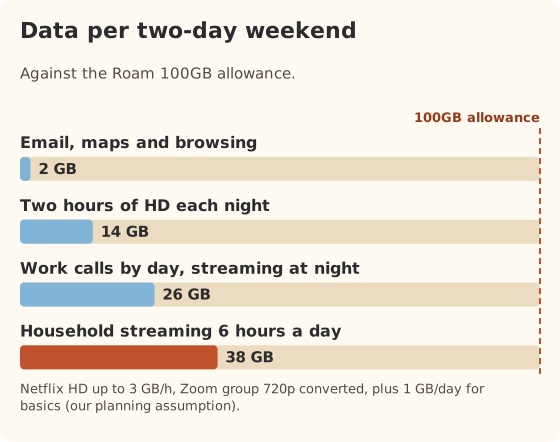
We count a weekend as two full days online: Friday evening to Sunday afternoon. The day totals below come from our data-use reference, which builds each day from the service’s own numbers plus 1 GB of basics (email, maps, updates) as our planning assumption.
| How you use it | GB per day | GB per weekend | Share of 100GB |
|---|---|---|---|
| Email, maps and browsing | 1 | 2 | 2% |
| Two hours of HD streaming each night, plus basics | 7 | 14 | 14% |
| Work calls by day, streaming at night | 13 | 26 | 26% |
| Household streaming most of the day (6 hours HD) | 19 | 38 | 38% |
HD streaming is Netflix’s own “up to 3 GB an hour” figure; work calls use Zoom’s recommended bandwidth for group video, converted to 1.98 GB an hour. Starlink’s own data page gives similar ballpark numbers: about 3 GB an hour for HD and about 7 GB an hour for 4K.
Two things can push a weekend higher:
- Big updates. Starlink warns that game and movie downloads can top 100 GB, and phones, consoles and even vehicles update over Wi-Fi in the background. Turn on “Low Data” mode on phones and run updates at home.
- Speed tests. Starlink says each speed test can use up to about 1 GB. Don’t run five of them every time you set up.
Step 3: plan options side by side
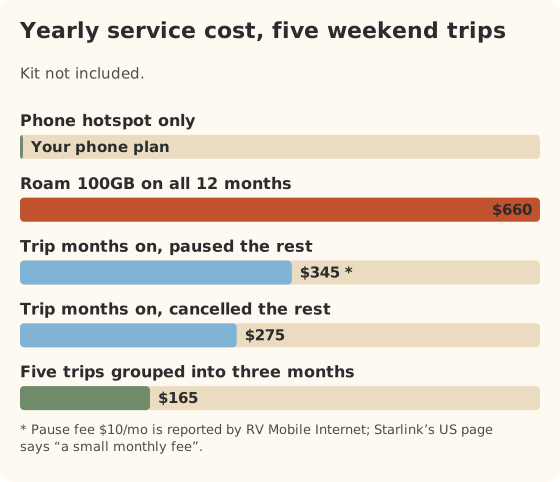
Here’s the yearly cost of five realistic patterns for someone with five weekend trips in five different months. All Starlink prices are from starlink.com’s public order data; the Standby fee is reported by RV Mobile Internet, not stated on starlink.com. The kit is a one-time $349 for the Standard kit bought on starlink.com.
| Pattern | Service per year | With the kit, first year | Catch |
|---|---|---|---|
| Phone hotspot only | Your phone plan | No kit needed | Needs cell signal at camp |
| Roam 100GB, on all 12 months | $660 | $1,009 | Paying for 7 idle months |
| Roam 100GB in trip months, paused the rest | $345 | $694 | Pause fee is reported, not official |
| Roam 100GB in trip months, cancelled the rest | $275 | $624 | Starlink warns reactivation isn’t always immediate |
| Same five trips squeezed into three months | $165 | $514 | Only works if your calendar allows |
Why not Roam 300GB? It costs $80/mo and only helps if you use more than 100GB inside one billing month. For weekends, that almost never happens. Unlimited at $175/mo is built for full-timers and travel abroad, not weekends.
Step 4: when a hotspot is enough
Be honest with yourself here, because this is where most weekend campers overspend.
A phone hotspot or cellular plan is enough when:
- Your phone works at the campground. If you get usable LTE or 5G there, you already have internet.
- You mostly use email, maps and weather, with a movie you downloaded at home.
- You camp at the same few parks. You can learn their coverage once instead of paying for satellite everywhere.
Satellite starts to make sense when:
- You boondock on public land where phones show no service.
- Your favorite parks are in canyons or mountains with known dead zones.
- Someone needs to work and can’t risk a dead spot.
Our longer comparison, when a hotspot beats any satellite plan, walks through carrier plans and coverage checks.
Worked example: five trips, two ways
Picture a couple who take five weekend trips from May to September, stream a movie each night and check email.
- Data: about 14 GB per weekend at two hours of HD a night. Under a fifth of the allowance.
- If they leave Roam 100GB on all year: $660 in service, about $132 per weekend trip.
- If they only pay in trip months: $275 in service, $55 per trip.
- If they move the June and July trips into the same month and August and September into another: three billing months, $165.
None of those include the kit, and none of them beat a phone hotspot that works at their campgrounds.
If one trip a year is long
Many weekend campers also take one longer trip, often in summer. That month is different: two weeks of evening streaming at about 7 GB a day is about 98 GB, right at the edge of 100GB. Upgrade to Roam 300GB for that month only, and schedule the step back down with the DATE option. Our six-week road trip guide covers the long-trip month in detail.
Common mistakes
- Buying the biggest plan “to be safe”. Weekends don’t need it. If one trip runs long, Starlink lets you you can switch from 100GB to 300GB or Unlimited (or 300GB to Unlimited) any time; you stay on the bigger plan for later cycles unless you switch back.
- Activating weeks before the first trip. The billing clock starts at activation. Activate a few days before you leave and test at home.
- Forgetting to change the plan back. After an upgrade, Starlink keeps you on the bigger plan for later months unless you switch back.
- Leaving it running all winter because you forgot. Put a reminder in your calendar for the day after your last trip.
What we don’t know
- Whether cancelling and reordering causes trouble for Roam specifically. Starlink’s cancel page warns about reactivation in general, without saying how often it affects Roam customers.
- The Standby fee as Starlink states it. Starlink’s US page says only “a small monthly fee”. The $10/mo figure is reported by RV Mobile Internet.
- Your campground’s cell signal. Only a recent visit or a recent camper can tell you that.
What to do next
Put your weekends and data use into the travel plan picker. It checks whether a hotspot is cheaper first, then shows the yearly cost of each satellite pattern. If one trip a year is a long one, read the six-week road trip guide for that month. If this is your first rig, start with deciding on internet before day one.
Questions people ask
Is Starlink worth it for weekend camping?
Only if you camp where phones don’t work, or you want reliable streaming at remote sites. For a few weekends a year at campgrounds with good cell signal, your phone’s hotspot is cheaper. If you do go satellite, Roam 100GB at $55/mo is enough for a weekend.
Can I pay for Starlink just for one weekend?
No. Roam plans bill monthly. Starlink starts your billing cycle the day the kit is activated, so a weekend trip means paying for that whole month. Group trips into fewer months if you can.
How much data does a camping weekend use?
In our planning numbers: about 2 GB for email, maps and browsing; about 14 GB if you also stream two hours of HD each night; about 38 GB if the household streams most of the day. Two of those weekends in one month still fit in 100GB.
Should I get Roam 100GB or 300GB for weekends?
100GB. The step to 300GB ($80/mo) only pays off if you use more than 100GB in a single billing month, which takes more than a couple of weekends.
What do I do with the plan between trips?
You can leave it on, pause it or cancel it. Each costs something different and has catches. The plan picker compares them for your trip count.
Sources
- How does the monthly service billing cycle work? (Starlink help center), retrieved Oct 6, 2026
- How do I cancel service? (Starlink help center), retrieved Oct 6, 2026
- Data Usage Best Practices (Starlink help center), retrieved Oct 6, 2026
- Roam plans and kits for US addresses (starlink.com public order data), retrieved Oct 5, 2026
- How to control how much data Netflix uses (Netflix Help Center), retrieved Oct 5, 2026
- Zoom system requirements: bandwidth (Zoom Support), retrieved Oct 5, 2026
- Starlink Roam, Residential and Standby Mode price increases (RV Mobile Internet), retrieved Oct 5, 2026
- Service Plan Changes (Starlink help center), retrieved Oct 5, 2026
Prices and plan rules on this page are filled in from our dated data files when the site is built; hover a number to see when we checked it.
Research and spec-based analysis. We haven’t used Starlink in an RV, van or boat; this post is built from Starlink’s own documents, carrier pages and dated reports, cited above. Links to Starlink’s plan pages here use the site owner’s own referral link: the owner may get a referral reward if you order, and your price is the same. There are no affiliate links. Starlink and Roam are trademarks of Space Exploration Technologies Corp. Starlink RV USA is not affiliated with, endorsed by, or sponsored by SpaceX or Starlink. Spotted an error? Tell us.