On this page (9 sections)
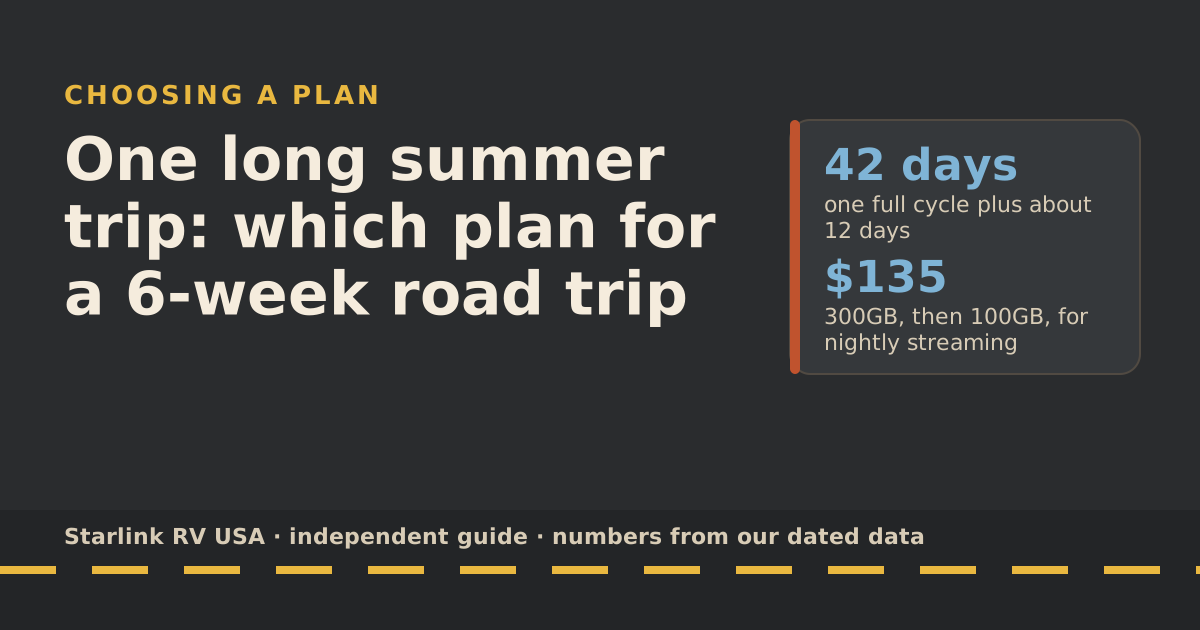
For a single 6-week road trip, pick the plan for each billing cycle separately: a 42-day trip covers one full cycle and about 12 days of the next. If you stream a couple of hours a night, start on Roam 300GB ($80/mo) and schedule a step-down to Roam 100GB ($55/mo) for the second cycle. Light users can stay on 100GB the whole way. Then set a reminder to cancel or pause before the third billing date.
That’s the whole strategy. The rest of this guide shows the math, the rules to check before you leave, and what to do when you get home.
Your trip touches two billing cycles
Starlink starts your billing cycle on the day the kit is first activated, and bills at the start of each cycle. Its own example: activate June 28, and your cycle runs June 28 to July 27; the next runs July 28 to August 27. If you activate on the 29th, 30th or 31st, the billing date moves to the 28th.
So a trip from June 28 to August 8 looks like this:
- Cycle 1: June 28 to July 27, 30 days on the road.
- Cycle 2: July 28 to August 27, but you’re home on August 8. Only about 12 days of use.
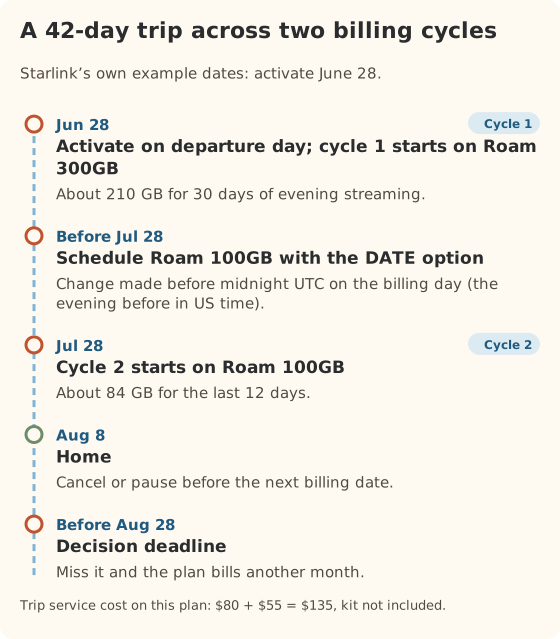
The tip that follows: activate on departure day, not a week before. Every day between activation and leaving is a day you pay for at home.
How much data six weeks uses
We use the day totals from our data-use reference: service-stated rates (Netflix for HD streaming, Zoom for video calls) plus 1 GB a day of basics as our planning assumption.
| How you use it | GB per day | Cycle 1 (30 days) | Cycle 2 (12 days) | Whole trip |
|---|---|---|---|---|
| Email, maps, browsing | 1 | 30 | 12 | 42 |
| Two hours of HD each night | 7 | 210 | 84 | 294 |
| Work calls plus evening streaming | 13 | 388 | 155 | 543 |
| Household streaming 6 hours a day | 19 | 570 | 228 | 798 |
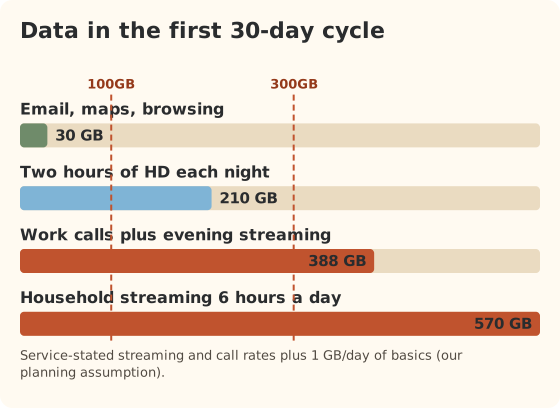
These are planning numbers, not measurements of your family. If you stream in standard definition instead of HD, Netflix says that’s up to 1 GB an hour instead of 3, which cuts the evening pattern by about two-thirds.
Plan choice for one trip
| How you use it | Cycle 1 plan | Cycle 2 plan | Trip service cost |
|---|---|---|---|
| Email, maps, browsing | Roam 100GB | Roam 100GB | $110 |
| Two hours of HD each night | Roam 300GB | Roam 100GB | $135 |
| Work calls plus evening streaming | Roam Unlimited | Roam 300GB | $255 |
| Household streaming 6 hours a day | Roam Unlimited | Roam 300GB | $255 |
Add the kit if you don’t own one: $349 for the Standard kit on starlink.com. Prices are before tax.
Two alternatives worth a look for heavy users:
- Roam 300GB plus cellular. If cycle 1 lands a bit over 300GB, a phone hotspot on good-coverage days can carry the overflow for less than the jump to Unlimited ($95 more for that month).
- Upgrade only if you need it. Start cycle 1 on 300GB and watch the counter. Starlink says switching mid-cycle gives you the new plan’s full allowance, so upgrading on day 20 isn’t wasted.
Making the step-down happen
Starlink offers two buttons when you change plans:
- NOW applies the change right away. For a downgrade, the rest of the current month isn’t refunded.
- DATE applies it at the end of the current billing cycle.
To step down for cycle 2, choose the smaller plan with DATE any time during cycle 1. Starlink’s billing is tied to UTC, so changes must be made before midnight UTC on your billing day. Our billing-cycle guide converts that to US time zones.
Rules to check before you leave
- Driving days. Every Roam plan allows in-motion use for passengers, up to 100 mph. It needs a supported dish and a proper mount. See passengers online while driving.
- Canada. Starlink says Roam 100GB and 300GB work only in your home country or grouped region: for US accounts, the US, Canada, Puerto Rico, US Virgin Islands, Guam, American Samoa and the Northern Mariana Islands. Travel Registration is still required before use outside your home country: Travel Registration with a passport or other government photo ID is required before use outside your home country.
- Mexico. Only Roam Unlimited works abroad: Roam Unlimited works outside your home country for up to 30 days at a time; going home resets the count. And in-motion use on land is prohibited in Mexico (boats only there).
- Evenings in busy places. Starlink says Roam plans are deprioritized compared with other plans, and lists peak hours as about 6 to 11 p.m. local time. Popular parks on summer nights may feel slower.
- Trees. National parks and forests are often tree-covered. The parks trip guide covers that pattern.
Every rule above has a dated history in the rules changelog. International rules changed in July and August 2026.
What to do after you get home
You have until your next billing date. Pick one:
- Cancel. Starlink says service stays active until the date you paid for, and that you may not be able to reactivate immediately later, depending on availability.
- Pause. Starlink offers a paid pause for travel plans. The plan picker shows what pausing costs over the months until your next trip, next to cancelling.
- Keep it. Only worth it if another trip is coming within a month or two.
Whatever you choose, do it before midnight UTC on the billing day. Miss it and you pay for another month.
Variations on the same trip
Four weeks instead of six. If you activate on departure day, a 28- to 30-day trip fits inside one billing cycle. Pick one plan for the whole trip: Roam 100GB for light use, 300GB for nightly streaming. Service cost: $55 or $80.
Eight weeks. About 56 days covers one full cycle plus about 26 days of a second one. The second cycle is nearly full, so step down only if your use drops. For nightly streaming, 300GB for both cycles is the simple answer: $160.
You already have a kit with a billing date mid-month. You can’t move the billing date. If your date falls mid-trip, think of the trip as “days before the date” and “days after”, and size each side separately. A trip from the 10th to the 21st of the next month with a billing date on the 1st, for example, is about three weeks in one cycle and three weeks in the next.
You’ll be home a week in the middle. Your plan keeps billing. If the home week has other internet, the Roam allowance just goes further; you don’t save money by pausing for one week.
Common mistakes
- Activating at home a week early to “test”. Test the kit, sure, but the billing clock starts at activation. Test the day before you leave.
- Buying Unlimited for the whole trip. For most families the second cycle is short enough for 100GB or 300GB.
- Forgetting the step-down. After an upgrade, Starlink keeps you on the bigger plan for future cycles unless you switch back.
- Assuming 300GB works in Mexico. It doesn’t. Only Unlimited works outside the US and Canada region.
What we don’t know
- Your real daily use. Kids, weather and work change it. Check the app’s data counter a week in and adjust.
- Coverage quality at specific parks. Recent campers know best.
- Future rule changes. International rules changed twice in 2026. Re-check the week you leave.
What to do next
Enter your trip length and data use in the travel plan picker. It recommends a plan and shows the yearly cost if this trip turns into a habit. If the trip runs through the big parks, read the national parks guide next.
Questions people ask
Which Starlink plan is best for a road trip?
For most 4–6 week trips, Roam 300GB ($80/mo) for the first billing month if you stream in the evenings, then Roam 100GB ($55/mo) for the last couple of weeks. Light users can stay on 100GB the whole way.
Do I have to pay for two months on a six-week trip?
Yes. Your billing cycle starts on activation day and runs about a month, so six weeks always touches two cycles. You can make the second one cheaper by stepping down to a smaller plan at the end of the first cycle.
Can I change plans in the middle of the trip?
Yes. Starlink lets you you can switch from 100GB to 300GB or Unlimited (or 300GB to Unlimited) any time; you stay on the bigger plan for later cycles unless you switch back. Upgrades with the NOW option start right away with the new plan’s full allowance. Downgrades with the DATE option start at the end of the current cycle.
Does Roam work in Canada on the 100GB or 300GB plan?
Starlink says Roam 100GB and 300GB work only in your home country or grouped region: for US accounts, the US, Canada, Puerto Rico, US Virgin Islands, Guam, American Samoa and the Northern Mariana Islands. Travel Registration with a government ID is still required before use outside your home country, so check that before you cross.
What should I do with the plan when I get home?
Cancel it or pause it before the next billing date. Starlink says cancelled service stays active until the paid-through date, and that reactivation later isn’t always immediate. The plan picker compares the cost of each option for your next trips.
Is the 30-day return window useful for a one-off trip?
We don’t recommend planning a trip around a return. Return terms are set by Starlink and can change; read the current terms on starlink.com before you rely on them.
Sources
- How does the monthly service billing cycle work? (Starlink help center), retrieved Oct 6, 2026
- How do I cancel service? (Starlink help center), retrieved Oct 6, 2026
- Can I change my Starlink plan during a billing cycle? (Starlink help center), retrieved Oct 6, 2026
- Slow Speeds: Outside/During Peak Hours (Starlink help center), retrieved Oct 6, 2026
- Roam plans and kits for US addresses (starlink.com public order data), retrieved Oct 5, 2026
- How to control how much data Netflix uses (Netflix Help Center), retrieved Oct 5, 2026
- Zoom system requirements: bandwidth (Zoom Support), retrieved Oct 5, 2026
- Can I use Starlink in-motion? (Starlink help center), retrieved Oct 5, 2026
- Traveling with Starlink Roam (Starlink help center), retrieved Oct 5, 2026
- What is Travel Registration? (Starlink help center), retrieved Oct 5, 2026
- Service Plan Changes (Starlink help center), retrieved Oct 5, 2026
Prices and plan rules on this page are filled in from our dated data files when the site is built; hover a number to see when we checked it.
Research and spec-based analysis. We haven’t used Starlink in an RV, van or boat; this post is built from Starlink’s own documents, carrier pages and dated reports, cited above. Links to Starlink’s plan pages here use the site owner’s own referral link: the owner may get a referral reward if you order, and your price is the same. There are no affiliate links. Starlink and Roam are trademarks of Space Exploration Technologies Corp. Starlink RV USA is not affiliated with, endorsed by, or sponsored by SpaceX or Starlink. Spotted an error? Tell us.