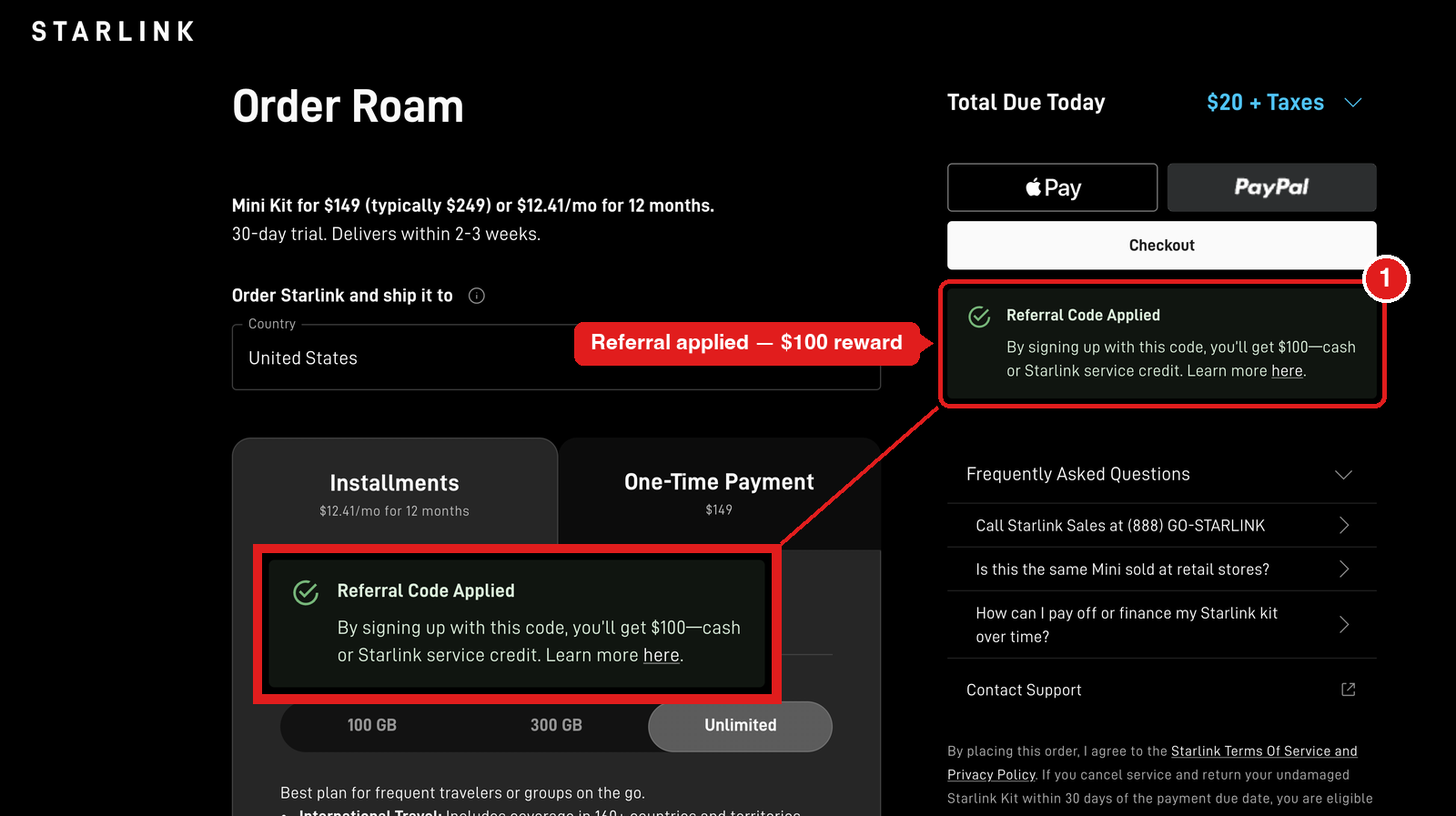
The route: from starlink.com to the green box
- Stay in the tab that just opened. It’s starlink.com with the referral already attached. Don’t copy the address into another browser or the Starlink app.
- Choose Roam. The tab opens on Starlink’s Roam page. If you landed elsewhere, use Starlink’s own menu to reach Roam rather than typing a new address.
- Pick your country: United States. Roam doesn’t ask for a street address the way Residential does. One country, then you’re through.
- Pick a data tier and a dish (the quick guide is just below). Starlink then shows the order page with your total.
- Find the Checkout button and look right under it. A green box should read “Referral Code Applied” and mention the $100. That box is your proof.
- Then check out in that same tab, on starlink.com.
Which tier for the road?
| Plan | Per month | Fits |
|---|---|---|
| Roam 100GB | $55/mo | Weekend and seasonal trips, light use; low-speed data after the cap |
| Roam 300GB | $80/mo | Longer trips, some streaming and video calls |
| Roam Unlimited | $175/mo | Full-timers who work from the rig, or anyone crossing borders |
Dish: the Mini kit is $149 (or $12.41/mo for 12 months); the Standard kit is $349. You can change Roam tiers later, so the referral doesn’t lock you into the one you pick today. Not sure? Our travel plan picker works it out from your trip days and data use.
No green box? Pull over and check these
- Reopen the link in the same browser. Close the starlink.com tab, come back here and use the button again, then go straight to the order page.
- Don’t switch devices or apps. The referral lives in the browser that opened the link. Clicking on your phone and ordering on the laptop, or finishing in the Starlink app, loses it.
- Private windows and cookie blockers. A private window, strict tracking protection or a cookie-blocking extension can drop the referral. Try a normal window with blocking paused for starlink.com.
- Typing starlink.com by hand starts over. A fresh address, a search result or a bookmark carries no referral. Only the link does.
- Already a Starlink customer? Existing and previous customers don’t qualify, so Starlink won’t show the box. That includes adding Roam to an account that already has Residential.
- Bought the kit at a store? Retail and store purchases, including a Mini from a big-box store, don’t qualify. The order has to go through starlink.com.
Referral link: the site owner’s own. Starlink may reward the owner if you order and stay subscribed; your price doesn’t change. How we make money
The reward, in four lines
- $100 for a new US customer who orders on starlink.com through a referral link; a new customer who orders through a referral link gets the same reward as the person who referred them, after two months subscribed.
- Credit first, cash if offered: paid as Starlink service credit by default, or as cash where your account offers it, once you’ve been subscribed for two months.
- Two billing cycles: stay subscribed through your first two monthly bills. Starlink applies the reward on the second invoice.
- Who’s out: existing and previous Starlink customers, and kits bought at a store. The amount is Starlink’s to set and can change; the referee gets the same reward as the referrer, in the amount specified in your Starlink account.
How this site earns from the link, and what that never changes: How we make money. Our own rules for using this site: Terms of use.
Quick questions before checkout
Do I need to type a referral code anywhere?
No. The code rides inside the link, and Starlink’s Roam order page has no box for one. If the link worked, the order page says “Referral Code Applied” under the Checkout button on its own.
Does the referral work if I pick the Mini instead of the Standard dish?
The screenshot on this page is a Roam Unlimited order with the Mini kit, and the green box was there. The reward is tied to you being a new customer who orders on starlink.com, not to one dish. Check the order page either way: what it shows is what counts.
I only travel part of the year. Does pausing affect the reward?
Starlink pays the reward after you have been subscribed for two months, on the second monthly bill. Starlink’s terms don’t spell out how a pause in Standby Mode counts, so the safe route is to keep the plan active through your first two bills before you pause between trips.
Can I order now and set up the dish when I hit the road?
Yes, the referral is applied when you order, not when you set up. The two-month clock for the reward runs from your subscription, so it starts when Starlink starts billing you.
Sources
- Roam plans and kits for US addresses (starlink.com public order data), read from starlink.com’s published data, checked Nov 16, 2026
- Does Starlink have a referral program? (Starlink help center), read from starlink.com’s published data, checked Nov 16, 2026
- Starlink Referral Program Terms, DOC-1882-84808-83 (version published Oct 7, 2026; unchanged on Nov 16, 2026), checked Nov 16, 2026