On this page (8 sections)
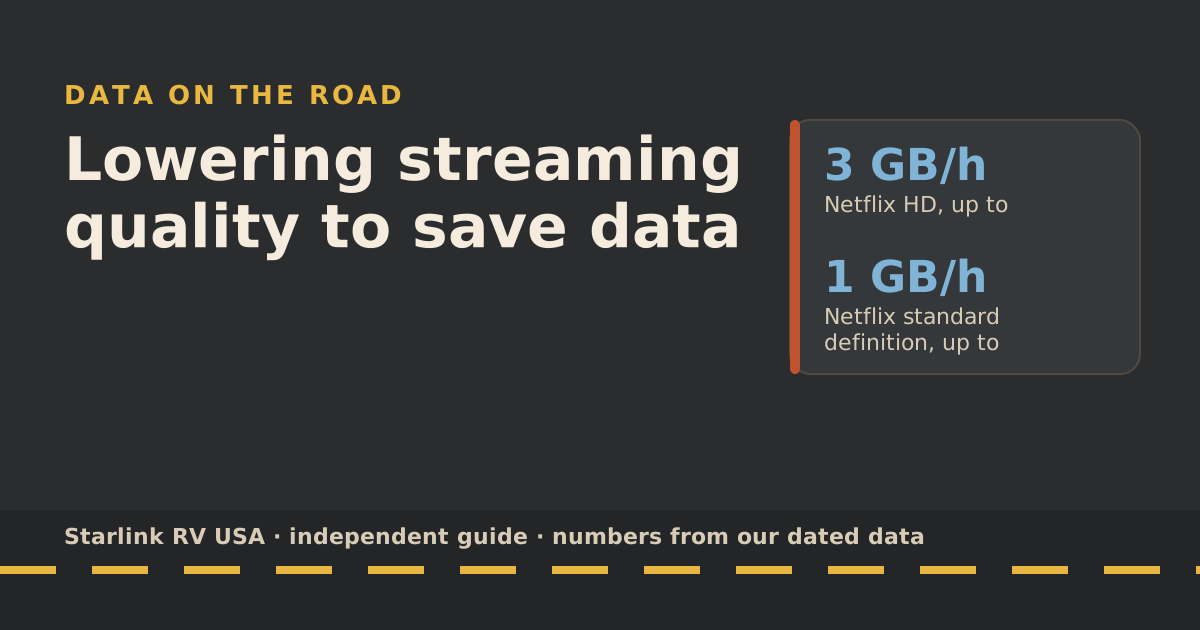
To make a capped Roam plan last, lower video quality first: it’s where most of the data goes. Netflix lists HD at up to 3 GB an hour and standard definition at up to 1 GB, so one setting cuts video data by about two-thirds. Set it in the right place, though. Phone apps often apply their data saver only on cellular, and your phone sees Starlink as Wi-Fi. Change the setting on each profile and each Wi-Fi network instead.
Quality vs GB per hour
These are the services’ own figures, from our data-use reference. Netflix’s are “up to” per device; YouTube’s are converted from its recommended speeds.
| Setting | GB per hour | Hours from Roam 100GB | Hours from Roam 300GB |
|---|---|---|---|
| Netflix 4K | 7 | 14 | 43 |
| Netflix HD | 3 | 33 | 100 |
| Netflix standard definition | 1 | 100 | 300 |
| Netflix Medium | 0.7 | 143 | 429 |
| Netflix Low | 0.3 | 333 | 1,000 |
| YouTube 1080p | 2.25 | 44 | 133 |
| YouTube 480p | 0.5 | 200 | 600 |
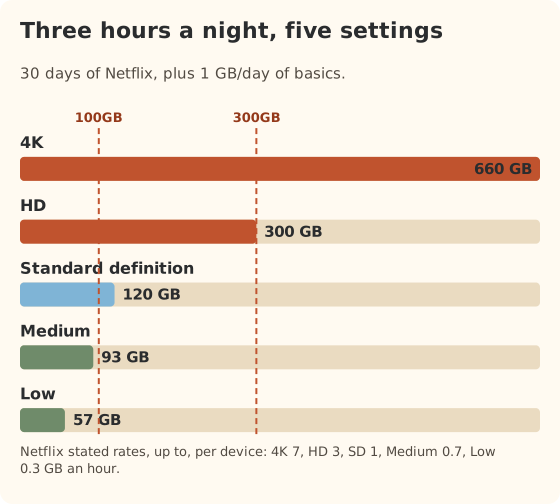
Starlink’s own guidance points the same way: video is the biggest use of data, and lower quality is the main fix.
App settings by service
Netflix
Netflix caps data per profile, and the cap follows that profile to every device, TV included.
- On a web browser, go to your Netflix Account page.
- Choose Profiles, then the profile.
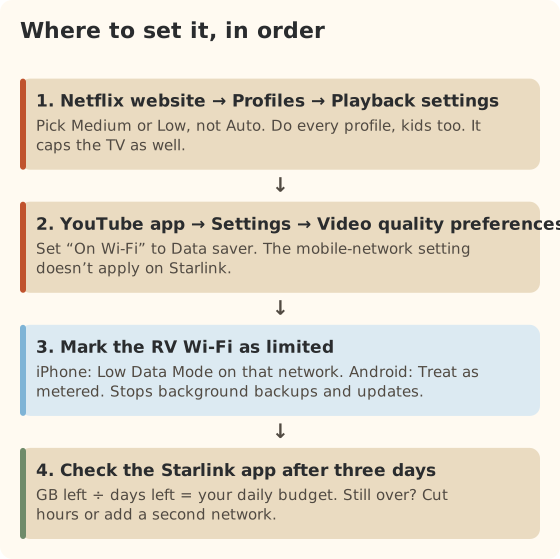
- Choose Playback settings and pick Low, Medium or High. Avoid Auto, which picks the highest quality the connection allows.
- Repeat for every profile. Kids’ profiles count too.
The phone app has a separate Cellular Data Usage setting. It only applies on cellular, so it won’t help on the RV’s Wi-Fi. Netflix notes that mobile devices won’t go over the profile’s Playback setting, so the website setting is the one that matters.
YouTube
In the YouTube app, tap your profile picture, then Settings, then Video quality preferences. There are separate choices for mobile networks and on Wi-Fi. Set the Wi-Fi one to Data saver. On a smart TV, the quality menu is usually in the player while a video plays, and it may not stick between videos.
Other streaming apps
Most live TV and sports apps don’t publish GB-per-hour rates, and many have no quality setting at all. Look for “data saver”, “video quality” or “streaming quality” in the app’s settings. If there isn’t one, the device-level limits below still help with background data.
Tell your phone the Wi-Fi is limited
Phones assume Wi-Fi is unlimited, so they back up photos, update apps and stream at full quality on it. You can change that per network:
| Device | Where | What it does |
|---|---|---|
| iPhone or iPad | Settings → Wi-Fi → ⓘ next to the RV network → Low Data Mode | Apple says it turns off Background App Refresh, reduces streaming quality, and pauses automatic downloads, backups and iCloud Photos updates |
| Android | Settings → Network & internet → Internet → the RV network → Network usage → Treat as metered | Gives you more control over downloads and background app data on that network |
| Windows laptop | Wi-Fi network properties → Metered connection | Holds back many updates on that network |
Do this once per device. It only affects the network you set it on, so the phone still behaves normally at home.
Download before you go
Downloads made on someone else’s network don’t count against Roam at all.
- Campground or library Wi-Fi. Often too slow to stream, but fine for downloading a few episodes overnight.
- A cellular plan with data to spare. Download in town, watch at camp.
- At home before a trip. The cheapest GB you’ll ever use.
Download at the same quality you’d stream, or lower; a 4K download is still a 4K-sized file.
Checking results
Check the data-usage screen in the Starlink app after two or three days. Divide what’s left by the days left in your cycle to get a daily budget. If you’re still over, the next lever is fewer hours or a second network, not more settings. Our 5-day plan for running low has the step-by-step version, and the data cap guide explains what Starlink counts.
A worked example: two hours a night of HD plus basics is 7 GB a day, or 210 GB over 30 days. In standard definition it’s 3 GB a day, or 90 GB. That’s the difference between needing Roam 300GB ($80/mo) and fitting in Roam 100GB ($55/mo) if you’re out all month.
Common mistakes
- Changing the phone app’s cellular setting and expecting it to work on Wi-Fi.
- Setting one Netflix profile and forgetting the kids’ profiles.
- Leaving the TV on Auto. On a fast satellite link, Auto picks high quality.
- Autoplay. The next episode starts while everyone’s asleep. Turn autoplay off in the profile settings.
- Background backups. A phone full of new trip photos can upload gigabytes the first night on Wi-Fi.
What we don’t know
- Real use on your devices. Netflix and YouTube publish “up to” or recommended rates; real use is often lower. Our own measured test is planned and will be published with its date and method.
- Apps without published rates. Live TV, sports and many smaller apps don’t say how much they use.
- Smart TV menus. They differ by brand and change with updates, so check yours.
What to do next
Set the four things in the flow above tonight. Then run your new hours through the data-use reference and see whether a smaller allowance now fits; the travel plan picker shows the yearly difference. If a family shares the rig, picking an allowance for a family adds up every screen.
Questions people ask
How much data does lowering video quality save?
By Netflix’s figures, HD is up to 3 GB an hour, standard definition up to 1 GB, Medium up to 0.7 GB and Low up to 0.3 GB. Going from HD to SD saves about 2 GB every hour you watch.
Why didn’t my phone’s data saver setting help?
Most phone apps apply their data saver only on cellular. Starlink reaches your phone as Wi-Fi, which the phone treats as unlimited. Set quality on Wi-Fi in each app, or mark the RV network as limited: Low Data Mode on iPhone, “Treat as metered” on Android.
Does streaming on a TV use more data than on a tablet?
Usually, because TVs pick higher quality on Auto. Netflix’s rates are per device, so the Playback setting on the profile is the one that caps the TV. Set it on the Netflix website.
Is standard definition watchable on a big TV?
It looks soft on a large screen, but it’s fine for most shows and news. Many RVers keep HD for one movie night and SD the rest of the week.
Do downloaded shows count against my Roam data?
Only if you download them over Starlink. Downloads made on campground Wi-Fi, a library, or a cellular plan don’t touch your Roam allowance.
What happens if I still run out?
You aren’t billed extra. Starlink says after the 100GB or 300GB runs out, service drops to unlimited low-speed data that handles email, calls and texts; streaming, big downloads and video calls are limited. You can also upgrade mid-cycle; switching plans mid-cycle gives you that plan’s full usage limit.
Sources
- How to control how much data Netflix uses (Netflix Help Center), retrieved Oct 6, 2026
- Change video quality (YouTube Help), retrieved Oct 6, 2026
- Use Low Data Mode on your iPhone and iPad (Apple Support), retrieved Oct 6, 2026
- Manage advanced network settings on your Android device (Android Help), retrieved Oct 6, 2026
- Data Usage Best Practices (Starlink help center), retrieved Oct 6, 2026
- What are the Roam service plans? (Starlink help center), retrieved Oct 6, 2026
- Roam plans and kits for US addresses (starlink.com public order data), retrieved Oct 5, 2026
- System requirements: recommended sustained speed (YouTube Help), retrieved Oct 5, 2026
- Service Plan Changes (Starlink help center), retrieved Oct 5, 2026
Prices and plan rules on this page are filled in from our dated data files when the site is built; hover a number to see when we checked it.
Research and spec-based analysis. We haven’t used Starlink in an RV, van or boat; this post is built from Starlink’s own documents, carrier pages and dated reports, cited above. Links to Starlink’s plan pages here use the site owner’s own referral link: the owner may get a referral reward if you order, and your price is the same. There are no affiliate links. Starlink and Roam are trademarks of Space Exploration Technologies Corp. Starlink RV USA is not affiliated with, endorsed by, or sponsored by SpaceX or Starlink. Spotted an error? Tell us.